Showing posts with label Excel. Show all posts

Friday, August 19, 2016

xlMatrix series: Subtracting 2 matrixes

Report any errors to afstblogs@gmail.com


Function xlMSUB(M1, M2)

    Dim rslt()
    Dim i, j
    Dim rws1, rws2, cls1, cls2
   
    rws1 = M1.Rows.Count
    cls1 = M1.Columns.Count
    rws2 = M2.Rows.Count
    cls2 = M2.Columns.Count
    ReDim rslt(1 To rws1, 1 To cls1)
   
    If (rws1 <> rws2) Or (cls1 <> cls2) Then
        xlMSUB = "xlERR1"
    Else
        For i = 1 To rws1
            For j = 1 To cls1
                rslt(i, j) = M1(i, j) - M2(i, j)
            Next j
        Next i
        xlMSUB = rslt
    End If
        
End Function

xlMatrix series: xlMADD - summing 2 matrixes

Report any errors to afstblogs@gmail.com


Function xlMADD(M1, M2)

    Dim rslt()
    Dim i, j
    Dim rws1, rws2, cls1, cls2
   
    rws1 = M1.Rows.Count
    cls1 = M1.Columns.Count
    rws2 = M2.Rows.Count
    cls2 = M2.Columns.Count
    ReDim rslt(1 To rws1, 1 To cls1)
   
    If (rws1 <> rws2) Or (cls1 <> cls2) Then
        xlMADD = "xlERR"
    Else
        For i = 1 To rws1
            For j = 1 To cls1
                rslt(i, j) = M1(i, j) + M2(i, j)
            Next j
        Next i
        xlMADD = rslt
    End If
        
End Function

Tuesday, August 16, 2016

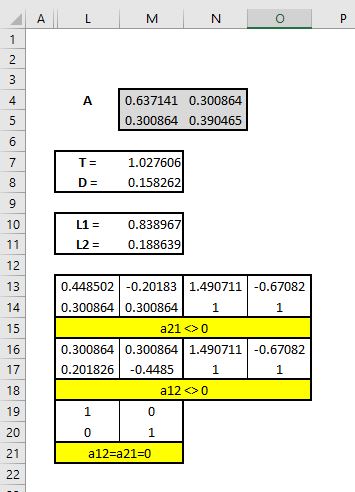
Eigenvalues and eigenvectors of 2x2 matrices

Source::


http://www.math.harvard.edu/archive/21b_fall_04/exhibits/2dmatrices/


M7: =M4+N5
M8: =PRODUCT(M4,N5)-PRODUCT(N4,M5)
M10: =M7/2+SQRT(M7^2/4-M8)
M11: =M7/2-SQRT(M7^2/4-M8)
L13: =M10-N5
L14: =M5
M13: =M11-N5
M14: =L14
N13: =L13/L14
N14: =L14/L14
O13: =M13/M14
O14: =M14/M14
L16: =N4
L17: =M10-M4
M16: =N4
M17: =M11-M4
N16: =L16/L17
N17: =L17/L17
O16: =M16/M17
O17: =M17/M17
L19: 1
L20: 0
M19: 0
M20: 1

Monday, August 8, 2016

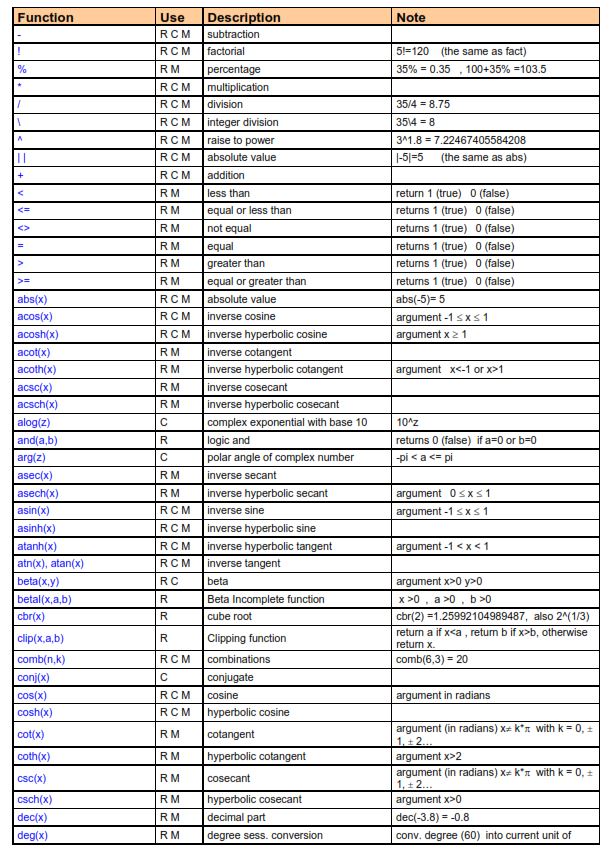
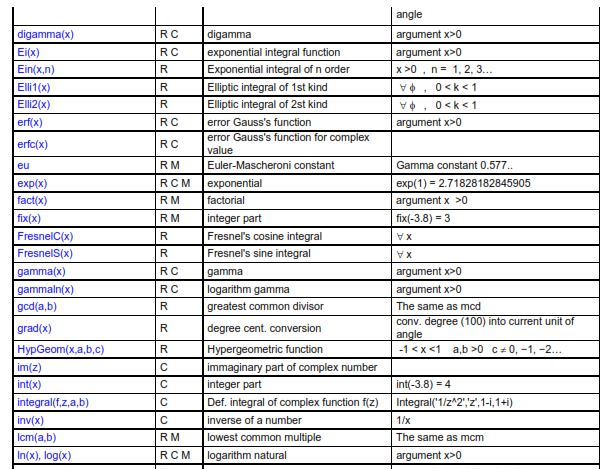
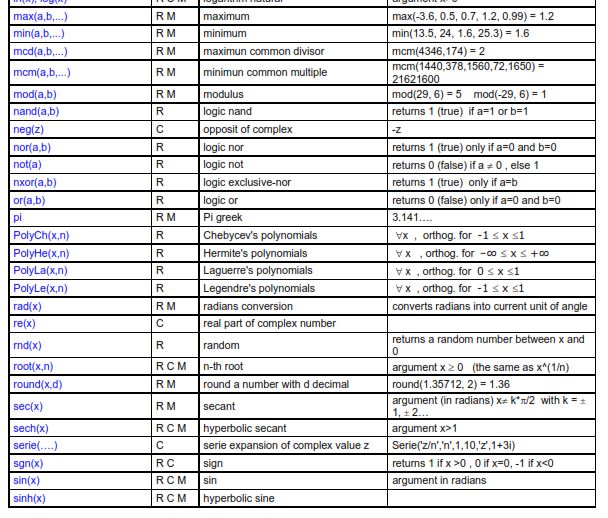
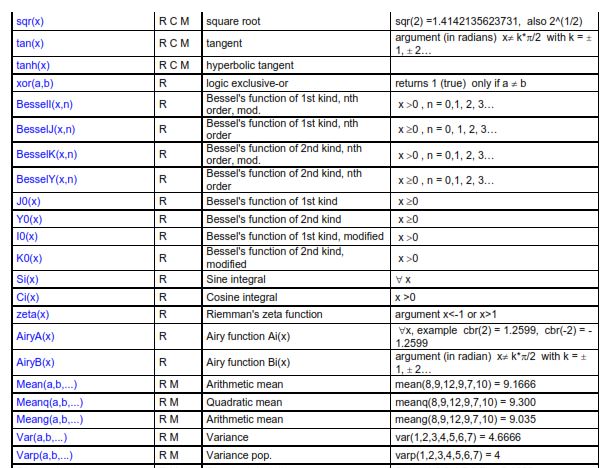
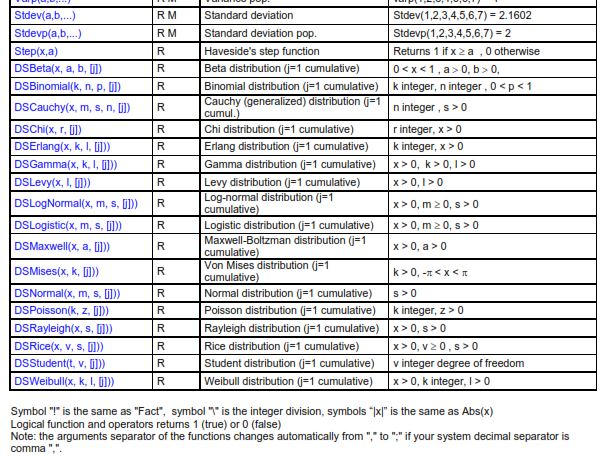
Th Xnumbers add-in: functions and special functions as presented in the Manual


All the elements presented are not warranted to be correct or free from defects.
Please report any errors found to  afstblogs@gmail.com

About the Xnumbers add-in


The original site with the address below is no longer available.
http://digilander.libero.it/_ppricerca/index.html

Download and general informartion

http://www.thetropicalevents.com/Xnumbers60.htm

Manual - 1

https://www.google.pt/url?sa=t&rct=j&q=&esrc=s&source=web&cd=7&cad=rja&uact=8&ved=0ahUKEwiWz_exrLHOAhXCVBQKHTlXAa0QFghSMAY&url=http%3A%2F%2Fwww.reading.ac.uk%2Fssc%2Fresource-packs%2FICRAF_2007-11-15%2Fresearch%2FResMetRes%2F5%2FHeiser%2Fnotes%2Fnoteaa.pdf&usg=AFQjCNFk20z89Gc06t5GLcIVSiqY8Lkc7w&sig2=RVy5Jd7iD3sZzeD5k1S1fA

NOTE: Many functions may seem not necessary but Xnumbers allows results with more digits than the limits of the Excel functions. 

The add-in contains more functions than those listed below namely regarding special functions 


Tuesday, July 26, 2016

Legendre polynomial (Legendre function of the first kind)


All the elements presented are not warranted to be correct or free from defects. 
Please report any errors found to  afstblogs@gmail.com

See also Legendre polynomials with Xnumbers add-in 

Excel formulas and VBA functions


D3: =IF(ISEVEN(B3),(-1)^(B3/2)*FACTDOUBLE(B3-1)/FACTDOUBLE(B3),0)
D4: =xlLegendrePn(B3,B4)


Leave cell I4 blank
Ranges I5:K5 and N5:P5 are merged

I6: =IF(H6=0,1,IF(H6=1,$I$2,(2*H6-1)/H6*$I$2*I5-(H6-1)/H6*I4))
J6: =xlLegendrePn(H6,$I$2)
K6: =Poly_Legendre($I$2,H6)

M6: =H6
N6: =(-1)^M6*I6
O6: =xlLegendrePn(M6,-$I$2)
P6: =Poly_Legendre(-$I$2,M6)


MyExcelRoutines

This function returns only the value of the polynomial. The computation of the first derivative will be the object of a separate function.

Function xlLegendrePn(n, x)

    Dim i
    Dim P0, P1, Pn, Pn_1, Pn_2
   
    P0 = 1: P1 = x
    Pn_1 = P1: Pn_2 = P0
   
    If (n <> Int(n) Or n < 0) Then
        xlLegendrePn = "** n **"
    ElseIf n = 0 Then
        xlLegendrePn = 1
    ElseIf n = 1 Then
        xlLegendrePn = x
    ElseIf x = 1 Then
        xlLegendrePn = 1
    ElseIf x = -1 Then
        xlLegendrePn = (-1) ^ n
    Else
        For i = 2 To n
            Pn = (2 * i - 1) / i * x * Pn_1 _
                    - (i - 1) / i * Pn_2
            Pn_2 = Pn_1
            Pn_1 = Pn
        Next i
         xlLegendrePn = Pn
    End If

End Function


Xnumbers add-in

Poly_Legendre is an array function that returns both the values of the polynomial and its first derivative calculated by the subroutine EvalLegendre.


Function Poly_Legendre(x, Optional n)
Dim Pol#, Dpol#, k&, z#
If IsMissing(n) Then k = 1 Else k = n
z = x
Call EvalLegendre(k, z, Pol, Dpol)
Poly_Legendre = PasteVector_(Array(Pol, Dpol))
End Function
Sub EvalLegendre(n&, x#, Pol#, Dpol#)
' Rutina para calcular el polinomio ortonormal de Legendre de orden n y su derivada en x
' Los polinomios de Legendre son un caso especial de los de Jacobi con a = b = 0
' Pol valor del polinomio en x; DPol valor de la derivada del polinomio en x
' Bibliografia: Abramowitz M et al.; "Handbook of Mathematical Functions...",Dover
'               Press et al.; "Numerical recipies in fotran77", Cambridge U Press
'mod. 12.4.04 VL
    Dim k&, p#(0 To 2), dp#(0 To 2)
   
    If n = 0 Then
        Pol = 1
        Dpol = 0
    ElseIf n = 1 Then
        Pol = x
        Dpol = 1
    Else
        p(0) = 1
        p(1) = x
        If Abs(x - 1) < 0.1 Or Abs(x + 1) < 0.1 Then
            dp(0) = 0
            dp(1) = 1
            For k = 1 To n - 1
                p(2) = ((2 * k + 1) * x * p(1) - k * p(0)) / (k + 1)             'Polinomio de orden k+1 en x
                dp(2) = ((2 * k + 1) * (p(1) + x * dp(1)) - k * dp(0)) / (k + 1) 'Derivata del polinomio di ' ordine k+1 in x .VL
                p(0) = p(1)
                p(1) = p(2)
                dp(0) = dp(1)
                dp(1) = dp(2)
            Next
            Pol = p(2)
            Dpol = dp(2)
        Else
            For k = 1 To n - 1
                p(2) = ((2 * k + 1) * x * p(1) - k * p(0)) / (k + 1)                    ' Polinomio de orden k+1 ' ' en x
                p(0) = p(1)                                                             ' (***)
                p(1) = p(2)
            Next
            Pol = p(2)
            Dpol = n * (x * p(2) - p(0)) / (x ^ 2 - 1)      ' Derivada del polinomio de orden k+1 en x
        End If
    End If
End Sub

From the Tutorial -1:


Matlab

Values of Pn(x)
Polynomials 


Friday, June 17, 2016

Three ways to use Excel worksheet functions in VBA


Function xlAverage01(rng)
    xlAverage01 = WorksheetFunction.Average(rng)
End Function

Function xlAverage02(rng)
    With WorksheetFunction
        xlAverage02 = .Average(rng)
    End With
End Function

Function xlAverage03(rng)
    Dim wsf As WorksheetFunction
    Set wsf = WorksheetFunction
    xlAverage03 = wsf.Average(rng)
End Function

Thursday, June 2, 2016

Mix-up about the covariance in Excel

One of the Excel mix-ups in its statistical functions that lasted longer is about the computation of the covariance.

Until recently (we think that this change was only introduced in the 2007 version) Excel provided two functions for the variance and standard deviation, one,for population and the other for sample data.

However, there was only one function for the covariance that returned the value for population data. There was (an there is) also only one function for the correlation, which is right, since the correlation values are the same for population ans sample data. This situation could lead to the erroneous conclusion that the covariance also has the same value for both cases.

The fixing of this situation was made by introducing two formulas for the computation of the covariance.

However, the procedure Covariance  of the Analysis ToolPak still returns the population covariances. Additionally, it also maintains another heritage mix-up. Although the Toolpak general methodology presents fixed values in the output, that does not change automatically if data values change, in this case the diagonals of the covariance matrix contain the formula to compute the population variance. This means that changes in the data will automatically change values in the diagonal, contrary to what happens for the other elements of the matrix.

The matrix.xla add-in, presented in another message also has only one function for the covariance matrix that returns the values for population data.

Wednesday, June 1, 2016

Generating correlated normal random numbers - Part 01

This function generates five columns containing numbers (the headers are not generated by the function):

  1. Order number (i)
  2.  Uniform random sequence (Z1)
  3. Uniform random sequence (Z2)
  4. First combination of Z1 and Z2  >>> Z3
  5. Second combination of Z2 and Z1 >>> Z4
The pairs (Z1,Z3) and (Z2,Z4) simulate a sample extracted from populations in which the pairs have a chosen value for the correlation. As it happens in sampling you usually get a value for the sampling correlation that differs from the population.

The values returned can be unstandardized specifying for each case the mean and standard deviation.

If you are not satisfied with the outcome, recalculate the spreadsheet. As the random values are generated by VBA code they are not volatile as it happens when you input the Excel built-in RAND function in a spreadsheet cell.

See more about volatility in the follow link in a post entitled Handle Volatile Functions like they are dynamite:


The inputs are:
  1. Number of lines in the sequences (k)
  2. Value of population correlation  
Source:
https://www.blogger.com/blogger.g?blogID=3230308801600609435#editor/target=post;postID=4988601992196925693;onPublishedMenu=posts;onClosedMenu=posts;postNum=1;src=postname

In a future message the remaining models in the source will be presented.


B6:E9 {=xlCorrMtx(B12:E41)}
A12:E41 {=xlRndNormal(C3,E3)}
H6:K9 {=xlCorrMtx(H12:K41)}
H12 =H$3+B12*H$4


Function xlRndNormal(k As Integer, corr)

    With WorksheetFunction
 
        Dim i As Integer
        Dim rslt()
        ReDim rslt(1 To k, 1 To 5)
 
        For i = 1 To k
            rslt(i, 1) = i
        Next i
 
        For i = 1 To k
            rslt(i, 2) = .Norm_S_Inv(Rnd)
        Next i
 
        For i = 1 To k
            rslt(i, 3) = .Norm_S_Inv(Rnd)
        Next i
 
        For i = 1 To k
            rslt(i, 4) = corr * rslt(i, 2) + Sqr(1 - corr ^ 2) * rslt(i, 3)
        Next i

        For i = 1 To k
            rslt(i, 5) = corr * rslt(i, 3) + Sqr(1 - corr ^ 2) * rslt(i, 2)
        Next i

        xlRndNormal = rslt
     
    End With

End Function

Sample covariance matrix


Function xlCovSMtx(rng As Range)
   
    Dim i, j
    Dim nCls As Integer
    Dim mtx()
   
    With WorksheetFunction
   
        nCls = rng.Columns.Count
        'MsgBox nCls
        ReDim mtx(1 To nCls, 1 To nCls)
   
        For i = 1 To nCls
            For j = 1 To nCls
                mtx(i, j) = .Covariance_S(rng.Columns(i), rng.Columns(j))
            Next j
        Next i
   
        xlCovSMtx = mtx
   
    End With

End Function

Function xlCovSMtx_U(rng As Range)
   
    Dim i, j
    Dim nCls As Integer
    Dim mtx()
   
    With WorksheetFunction
   
        nCls = rng.Columns.Count
        'MsgBox nCls
        ReDim mtx(1 To nCls, 1 To nCls)
   
        For i = 1 To nCls
            For j = 1 To nCls
                If i <= j Then
                    mtx(i, j) = .Covariance_S(rng.Columns(i), rng.Columns(j))
                Else
                    mtx(i, j) = 0
                End If
            Next j
        Next i
   
        xlCovSMtx_U = mtx
   
    End With

End Function

Function xlCovSMtx_L(rng As Range)
   
    Dim i, j
    Dim nCls As Integer
    Dim mtx()
   
    With WorksheetFunction
   
        nCls = rng.Columns.Count
        'MsgBox nCls
        ReDim mtx(1 To nCls, 1 To nCls)
   
        For i = 1 To nCls
            For j = 1 To nCls
                If i >= j Then
                    mtx(i, j) = .Covariance_S(rng.Columns(i), rng.Columns(j))
                Else
                    mtx(i, j) = 0
                End If
            Next j
        Next i
   
        xlCovSMtx_L = mtx
   
    End With

End Function


Sunday, May 29, 2016

Correlation matrix


    Dim i, j
    Dim nCls As Integer
    Dim mtx()
   
    With WorksheetFunction
   
        nCls = rng.Columns.Count
        'MsgBox nCls
        ReDim mtx(1 To nCls, 1 To nCls)
   
        For i = 1 To nCls
            For j = 1 To nCls
                mtx(i, j) = .Correl(rng.Columns(i), rng.Columns(j))
            Next j
        Next i
   
        xlCorrMtx = mtx
   
    End With

End Function

Function xlCorrMtx_U(rng As Range)
   
    Dim i, j
    Dim nCls As Integer
    Dim mtx()
   
    With WorksheetFunction
   
        nCls = rng.Columns.Count
        'MsgBox nCls
        ReDim mtx(1 To nCls, 1 To nCls)
   
        For i = 1 To nCls
            For j = 1 To nCls
                If i <= j Then
                    mtx(i, j) = .Correl(rng.Columns(i), rng.Columns(j))
                Else
                    mtx(i, j) = 0
                End If
            Next j
        Next i
   
        xlCorrMtx_U = mtx
   
    End With

End Function

Function xlCorrMtx_L(rng As Range)
   
    Dim i, j
    Dim nCls As Integer
    Dim mtx()
   
    With WorksheetFunction
   
        nCls = rng.Columns.Count
        'MsgBox nCls
        ReDim mtx(1 To nCls, 1 To nCls)
   
        For i = 1 To nCls
            For j = 1 To nCls
                If i >= j Then
                    mtx(i, j) = .Correl(rng.Columns(i), rng.Columns(j))
                Else
                    mtx(i, j) = 0
                End If
            Next j
        Next i
   
        xlCorrMtx_L = mtx
   
    End With

End Function


Friday, May 27, 2016

The matrix.xla add-in


This add-in for Excel 2000/XP is composed by 4 files:

  • matrix.xla
  • matrix.hlp
  • matrix.csv (*)
  • FunCustomize.dll  (**)

(*) "matrix.csv" can be used only if you have XNUMBERS 2.4 package. In that case put the CSV file in the same directory of xnumbers. The Xnumbers function handbook will be able to load also the new functions of "matrix.xla"
(**)  appears by courtesy of Laurent Longre  (http://longre.free.fr)

It is available for download at The downloads section at (the sites of matrix.xla and FunCustomize are no longer available).


that contains also other applications from the same team (Leonardo Volpi; John Beyers).

Unfortunately, if it is not my fault, some problems arise when working with this add-in in recent versions of Excel. However, since the code is open you can access the VBA code and import the desired routines to your workbook or even to an add-in.

In some cases, the routines import process is not straightforward since there are routines that call other routines, implying the necessity of tracing the computation flow. Another option that seem to work is the importation of the relevant VBA modules.

Another limitation is that, as it seems, Microsoft ceased to support the old format help files. To sidestep this situation you can use the add-in tutorials that are available in several sites, namely

Volume 1

Volume 2

www.cs.bsu.edu/homepages/kerryj/kjones/MatrixTutorial2.pdf

 You can also covert the add-in (xla) to a Workbook format performing the steps indicated in 


  • Press Alt F11
  • Press Ctrl R
  • In the window pane click the "Thisworkbook" object
  • Press F4
  • Scroll down this window until you see
  • IsAddin
  • Change the property to False
  • Now save the workbook as xls

The workbook obtained has a sheet with detailed information about the routines listed below. As far as I understand, these are only the master routines that call auxiliary routines not listed.  

One simple way to get all procedures listed is 
  • Copy the entire codes to an Excel spreadsheet column
  • Sort the contents of the column
  • Delete the rows that do not contain procedure declarations


Name Function Description
Gauss_Jordan_step Gauss Jordan algorithm step by step
Gram_Schmidt Gram-Schmidt's Orthonormalization
Interpolate Interpolation with polynomials
M_ABS Euclidean Norm of vector or matrix
M_ADD Addition of matrices 
M_BAB Similarity transform [B]*[A]*[B]^-1
M_DET Determinant
M_DET_C Determinant for complex matrix
M_DET3 Determinant for tridiagonal matrices
M_DIAG Diagonal matrix from a vector
M_DIAG_ERR Diagonalization error
M_EXP Matrix series expansion e^[M]
M_EXP_ERR Truncation error of matrix expansion series
M_ID Matrix Identity (I)
M_INV Matrix inverse [A]^-1
M_INV_C Complex Matrix inverse [A]^-1
M_MULT_C Complex matrices multiplication
M_MULT3 Mutliplication for tridiagonal matrix
M_POW Power of matrix [A]^n
M_PROD Product of matrices [A]*[B]*[C]*….
M_PROD_S Matrix multiplication for a scalar
M_RANK Rank of matrix
M_SUB Subtraction of matrices
M_T Matrix transpose
M_TRAC Trace
M_TRIA_ERR Triangolarization error
Mat_Adm Returns the Admittance matrix of a linear passive network
Mat_BlokPerm Returns the permutation vector of block-partitioned matrix
Mat_Blok Returns the block-partitioned matrix
Mat_Cholesky Cholesky decomposition
Mat_Hessemberg Hessemberg form
Mat_Hilbert Returns Hilbert's matrix
Mat_Householder Returns Houseolder matrix
Mat_Leontief Returns the Leontief inverse matrix of Input Output Analysis
Mat_LU LU decomposition
Mat_QR QR decomposition
Mat_QR_iter Performs the diagonalization with the QR iterative method
Mat_Tartaglia Returns Tartaglia's matrix
Mat_Vandermonde Returns Vandermonde's matrix
MatCharPoly Characteristic polynomial coefficients
MatCmpn Companion matrix
MatCorr Correlation matrix
MatCovar Covariance matrix
MatDiagExtr Diagonal extractor 
MatEigenvalue_Jacobi Eigenvalues of symmetric matrix with Jacobi algorithm
MatEigenvalue_max Dominant eigenvectors with powers' method
MatEigenvalue_pow Eigenvectors with powers' method
MatEigenvalue_QL Eigenvalues of tridiagonal matrix
MatEigenvalue_QR Eigenvalues with QR algorithm
MatEigenvalue_TridUni Eigenvalues of tridiagonal uniform matrix
MatEigenvector Eigenvector of eigenvalue
MatEigenvector_C Complex eigenvector of eigenvalue
MatEigenvector_inv Eigenvector of  eigenvalue
MatEigenvector_Jacobi Eigenvectors of symmetric matrix with Jacobi algorithm
MatEigenvector_max Dominant eigenvalues with powers' method
MatEigenvector_pow Eigenvalues with powers' method
MatEigenvector3 Eigenvectors of tridiagonal matrix
MatExtract Extract sub-matrix
MatMopUp Matrix mop-up of round-off errors
MatNorm Vector or Matrix Norm
MatNormalize Vectors Normalization
MatOrtNorm Orthonormalization
MatPerm Permutation matrix
MatRnd Random matrix
MatRndEig Random matrix with given eigenvalues
MatRndEigSym Random symmetric matrix with given eigenvalues
MatRndRank Random matrix with given rank or determinant
MatRndSim Random symmetric matrix with given rank or det.
MatRot Returns the orthogonal planar rotation matrix
MatRotation_Jacobi Jacobi's rotation matrix
Path_Floyd All-pairs-path of Graph with Floyd's algorithm
Path_Min Returns the shortest path of a Graph with Floyd's algorithm
Poly_Roots Polynomial rootfinder with Lin-Bairstow method
Poly_Roots_QR Polynomial rootfinder with QR method
ProdScal Scalar Product (inner)
ProdScal_C Complex scalar product
ProdVect Vector Product 3D
REGRL Linear regression with SVD
REGRP Polynomial regression
RRMS root mean squares 
Simplex Linear Optimization with Simplex method
SVD_D Singular Value Decomposition [U]*[D]*[V]^t: returns D
SVD_U Singular Value Decomposition [U]*[D]*[V]^t: returns U
SVD_V Singular Value Decomposition [U]*[D]*[V]^t: returns V
SYSLIN Solve Linear System [A]x=b
SYSLIN_C Solve a Complex Linear System [A]x=b
SYSLIN_ITER_G Solve Linear System with Gauss-Seidel algorithm
SYSLIN_ITER_J Solve Linear System with Jacobi algorithm
SYSLIN_T Solve triangular linear sistem
SYSLIN3 Solve tridiagonal linear system
SYSLINSING Solve Singular Linear System [A]x=b
TRASFLIN Linear Transform
VarimaxIndex Returns the Varimax index of a given Factors matrix
VarimaxRot Computes the orthogonal rotation with Varimax Kaiser's
M_MULT_TPZ Multiplies a Toeplitz matrix for a vector
SYSLIN_TPZ Solve Toeplitz Linear System [A]x=b
M_TPZ_ERR Toeplitz matrix error