Showing posts with label Special functions. Show all posts

Monday, August 8, 2016

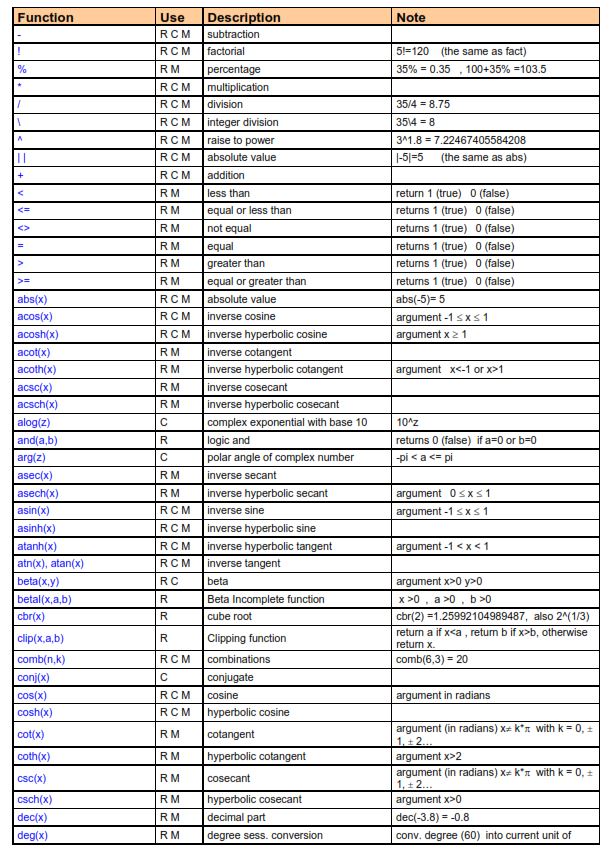
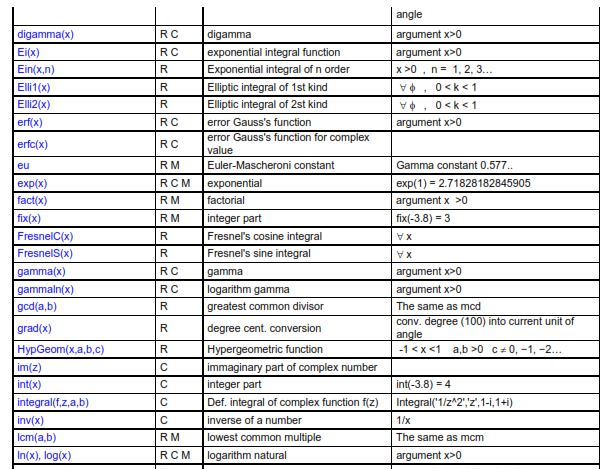
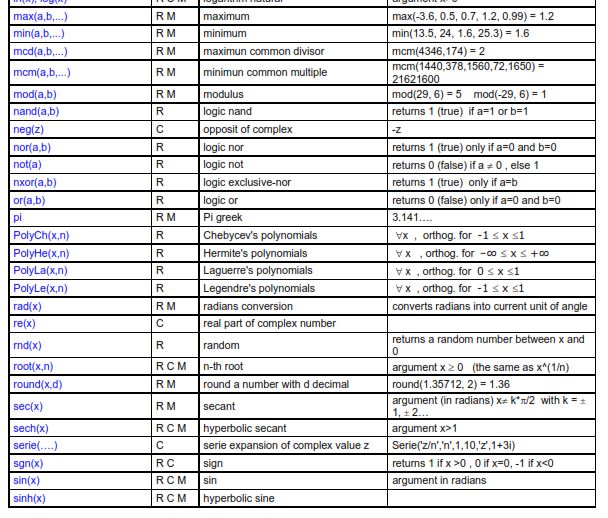
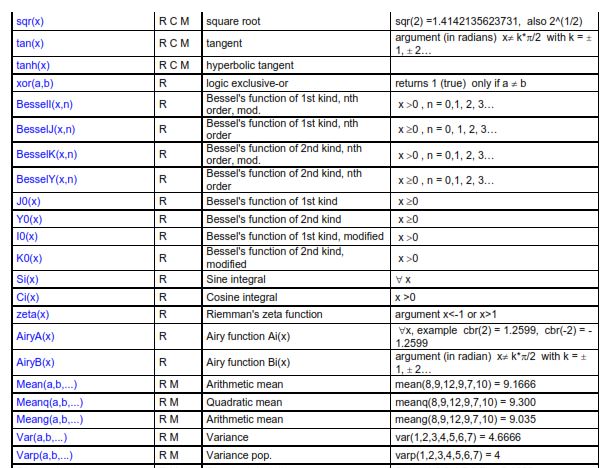
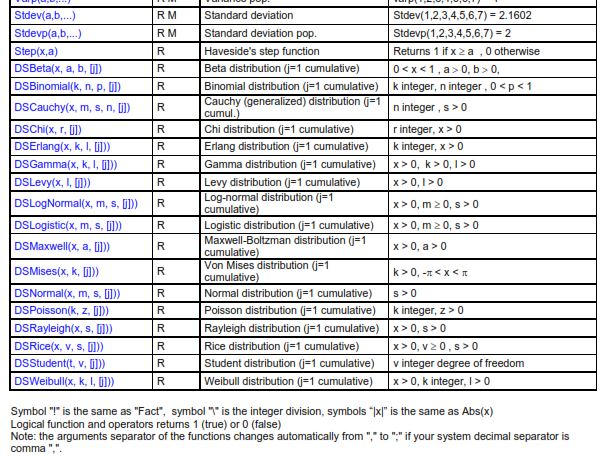
Th Xnumbers add-in: functions and special functions as presented in the Manual


All the elements presented are not warranted to be correct or free from defects.
Please report any errors found to  afstblogs@gmail.com

About the Xnumbers add-in


The original site with the address below is no longer available.
http://digilander.libero.it/_ppricerca/index.html

Download and general informartion

http://www.thetropicalevents.com/Xnumbers60.htm

Manual - 1

https://www.google.pt/url?sa=t&rct=j&q=&esrc=s&source=web&cd=7&cad=rja&uact=8&ved=0ahUKEwiWz_exrLHOAhXCVBQKHTlXAa0QFghSMAY&url=http%3A%2F%2Fwww.reading.ac.uk%2Fssc%2Fresource-packs%2FICRAF_2007-11-15%2Fresearch%2FResMetRes%2F5%2FHeiser%2Fnotes%2Fnoteaa.pdf&usg=AFQjCNFk20z89Gc06t5GLcIVSiqY8Lkc7w&sig2=RVy5Jd7iD3sZzeD5k1S1fA

NOTE: Many functions may seem not necessary but Xnumbers allows results with more digits than the limits of the Excel functions. 

The add-in contains more functions than those listed below namely regarding special functions 


Tuesday, July 26, 2016

Legendre polynomial (Legendre function of the first kind)


All the elements presented are not warranted to be correct or free from defects. 
Please report any errors found to  afstblogs@gmail.com

See also Legendre polynomials with Xnumbers add-in 

Excel formulas and VBA functions


D3: =IF(ISEVEN(B3),(-1)^(B3/2)*FACTDOUBLE(B3-1)/FACTDOUBLE(B3),0)
D4: =xlLegendrePn(B3,B4)


Leave cell I4 blank
Ranges I5:K5 and N5:P5 are merged

I6: =IF(H6=0,1,IF(H6=1,$I$2,(2*H6-1)/H6*$I$2*I5-(H6-1)/H6*I4))
J6: =xlLegendrePn(H6,$I$2)
K6: =Poly_Legendre($I$2,H6)

M6: =H6
N6: =(-1)^M6*I6
O6: =xlLegendrePn(M6,-$I$2)
P6: =Poly_Legendre(-$I$2,M6)


MyExcelRoutines

This function returns only the value of the polynomial. The computation of the first derivative will be the object of a separate function.

Function xlLegendrePn(n, x)

    Dim i
    Dim P0, P1, Pn, Pn_1, Pn_2
   
    P0 = 1: P1 = x
    Pn_1 = P1: Pn_2 = P0
   
    If (n <> Int(n) Or n < 0) Then
        xlLegendrePn = "** n **"
    ElseIf n = 0 Then
        xlLegendrePn = 1
    ElseIf n = 1 Then
        xlLegendrePn = x
    ElseIf x = 1 Then
        xlLegendrePn = 1
    ElseIf x = -1 Then
        xlLegendrePn = (-1) ^ n
    Else
        For i = 2 To n
            Pn = (2 * i - 1) / i * x * Pn_1 _
                    - (i - 1) / i * Pn_2
            Pn_2 = Pn_1
            Pn_1 = Pn
        Next i
         xlLegendrePn = Pn
    End If

End Function


Xnumbers add-in

Poly_Legendre is an array function that returns both the values of the polynomial and its first derivative calculated by the subroutine EvalLegendre.


Function Poly_Legendre(x, Optional n)
Dim Pol#, Dpol#, k&, z#
If IsMissing(n) Then k = 1 Else k = n
z = x
Call EvalLegendre(k, z, Pol, Dpol)
Poly_Legendre = PasteVector_(Array(Pol, Dpol))
End Function
Sub EvalLegendre(n&, x#, Pol#, Dpol#)
' Rutina para calcular el polinomio ortonormal de Legendre de orden n y su derivada en x
' Los polinomios de Legendre son un caso especial de los de Jacobi con a = b = 0
' Pol valor del polinomio en x; DPol valor de la derivada del polinomio en x
' Bibliografia: Abramowitz M et al.; "Handbook of Mathematical Functions...",Dover
'               Press et al.; "Numerical recipies in fotran77", Cambridge U Press
'mod. 12.4.04 VL
    Dim k&, p#(0 To 2), dp#(0 To 2)
   
    If n = 0 Then
        Pol = 1
        Dpol = 0
    ElseIf n = 1 Then
        Pol = x
        Dpol = 1
    Else
        p(0) = 1
        p(1) = x
        If Abs(x - 1) < 0.1 Or Abs(x + 1) < 0.1 Then
            dp(0) = 0
            dp(1) = 1
            For k = 1 To n - 1
                p(2) = ((2 * k + 1) * x * p(1) - k * p(0)) / (k + 1)             'Polinomio de orden k+1 en x
                dp(2) = ((2 * k + 1) * (p(1) + x * dp(1)) - k * dp(0)) / (k + 1) 'Derivata del polinomio di ' ordine k+1 in x .VL
                p(0) = p(1)
                p(1) = p(2)
                dp(0) = dp(1)
                dp(1) = dp(2)
            Next
            Pol = p(2)
            Dpol = dp(2)
        Else
            For k = 1 To n - 1
                p(2) = ((2 * k + 1) * x * p(1) - k * p(0)) / (k + 1)                    ' Polinomio de orden k+1 ' ' en x
                p(0) = p(1)                                                             ' (***)
                p(1) = p(2)
            Next
            Pol = p(2)
            Dpol = n * (x * p(2) - p(0)) / (x ^ 2 - 1)      ' Derivada del polinomio de orden k+1 en x
        End If
    End If
End Sub

From the Tutorial -1:


Matlab

Values of Pn(x)
Polynomials 


Friday, January 29, 2016

Special functions: Kummer confluent hypergeometric functions


All the elements presented are not warranted to be correct or free from defects. 
Please report any errors found to  afstblogs@gmail.com


For a wide set of formulas for confluent hypergeometric functions access http://dlmf.nist.gov/13. here we will examine only confluent hypergeometric functions of the first and second kind that are the solution of the Kummer differential equation. Wikipedia presents the following formulas:


Kummer's function of the first kind


This function is also presented as 1F1.

Kummer's function of the second kind


The function of the first kind will be used soon as part of the expression of the probability density functions of the noncentral Student's t and sample correlation distributions.


Excel formulas and user defined functions


The only function presented is the one for the firs kind contained in the function XN.xlam6056M add-in that is free and can be downloaded from http://www.bowdoin.edu/~rdelevie/excellaneous/.  

It is not straightforward to compute this function without using VBA. In alternative the computation with Maple Excel add-in is presented. In future messages its use will be explained.


XNumbers60


'ATTENTION 
'Const TOL# = 1.6 * Ten_16
    'changed to
'Const TOL# = 1.6 * 1E-16

'return the M(a,b,z) Kummer confluent hypergeometric function of 1st kind
'it uses the serie expansion method
'
Function Kummer1(a, b, z)
Dim n&, kn#, PN#, dY#, y#, ua#
'Const TOL# = 1.6 * Ten_16
Const TOL# = 1.6 * 1E-16
kn = 1#: PN = 1#:  y = 1#
'Kummer's transformation for negative value of z
If z < 0 Then ua = b - a Else ua = a
For n = 1 To 999
    kn = kn * (ua + n - 1) / (b + n - 1)
    PN = PN * Abs(z) / n
    dY = kn * PN
    y = y + dY
    If Abs(dY) < TOL * Abs(y) Then Exit For
Next n
If n < 999 Then
    If z < 0 Then y = y * Exp(z)  'Kummer's anti-transformation
    Kummer1 = y
Else
    Kummer1 = "?"
End If
End Function

Matlab

Matlab has not a function to compute this function, meaning that a user defied must be used. The one presented below is from
http://www.mathworks.com/matlabcentral/fileexchange/29766-confluent-hypergeometric-function/content/kummer.m


function f = kummer(a,b,x)

% This function estimates the Kummer function with the specified tolerance
% the generalized hypergeometric series, noted below.  This solves Kummer's
% differential equation:
%
%       x*g''(x) + (b - x)*g'(x) - a*g(x) = 0

% Default tolerance is tol = 1e-10.  Feel free to change this as needed.
tol = 1e-10;

% Estimates the value by summing powers of the generalized hypergeometric
% series:
%
%       sum(n=0-->Inf)[(a)_n*x^n/{(b)_n*n!}
%
% until the specified tolerance is acheived.

term = x*a/b;
f = 1 + term;
n = 1;
an = a;
bn = b;
nmin = 10;
while(n < nmin)||max(abs(term) > tol)
  n = n + 1;
  an = an + 1;
  bn = bn + 1;
  term = x.*term*an/bn/n;
  f = f + term;
end

% VERSION INFORMATION
% v1 - Written to support only scalar inputs for x
% v2 - Changed to support column inputs for x by using the repmat
% command and using matrix multiplication to achieve the desired sum
%
% v3 - Credit goes to Ben Petschel for making this suggestion.
%    The previous method of creating vectors for multiplication to
%    produce the sum was replaced by a while loop that executes
%    until a certain tolerance is achieved.  My previous thinking
%    was avoiding a loop would produce a code that would execute
%    faster.  Ben pointed out this is not necessarily true, and not
%    true in this case.  Not only does the while loop used execute
%    faster for this calculation, but it is also more accurate.

end


Thursday, January 21, 2016

Special functions: Incomplete beta functions


All the elements presented are not warranted to be correct or free from defects. 
Please report any errors found to  afstblogs@gmail.com


INCOMPLETE BETA FUNCTIONS

Like the incomplete gamma function, there are four "variations" of the outputs we can get:
  1. Incomplete beta ratio lower tail
  2. Incomplete beta ratio upper tail
  3. Incomplete beta lower tail
  4. Incomplete beta upper tail
In this blog when the nature of the function is not specified we refer to the ratio lower tail that will be the object of the Excel formulas and user defined functions presented


BETA DISTRIBUTION


EXCEL FORMULA AND USER DEFINED FUNCTIONS


' Incomplete beta ratio function
Function xlINCBETA(x, a, b)
  With WorksheetFunction
    xlINCBETA = .Beta_Dist(x, a, b, 1)
  End With
End Function 


MATLAB


>> betainc(.5,.5,.2,'lower')
ans =
    0.2682
>> 
betainc(.5,.5,.2,'upper')
ans =
    0.7318